We have compiled a list of manufacturers, distributors, product information, reference prices, and rankings for Visualization Software.
ipros is IPROS GMS IPROS One of the largest technical database sites in Japan that collects information on.

Visualization Software Product List and Ranking from 19 Manufacturers, Suppliers and Companies | IPROS GMS

Last Updated: Aggregation Period:Jan 14, 2026~Feb 10, 2026
This ranking is based on the number of page views on our site.

Visualization Software Manufacturer, Suppliers and Company Rankings

Last Updated: Aggregation Period:Jan 14, 2026~Feb 10, 2026
This ranking is based on the number of page views on our site.

  1. システムクリエイト Osaka//Industrial Machinery
  2. null/null
  3. 株式会社サン・プラニング・システムズ DX事業部 Tokyo//software
  4. 4 ヒューリンクス Tokyo//software
  5. 5 横浜総合研究所 Kanagawa//software

Visualization Software Product ranking

Last Updated: Aggregation Period:Jan 14, 2026~Feb 10, 2026
This ranking is based on the number of page views on our site.

  1. CT data analysis and visualization software 'VGSTUDIO MAX' システムクリエイト
  2. Pleasanter Implementation Case | Budget Management Dashboard
  3. Multidimensional data visualization/learning and recognition 横浜総合研究所
  4. How to Utilize Grapher for Surfer Users ヒューリンクス
  5. 4 Three Examples of Business Visualization for the Automotive Industry 株式会社サン・プラニング・システムズ DX事業部

Visualization Software Product List

1~28 item / All 28 items

Displayed results

Multidimensional data visualization/learning and recognition

It provides a function to visually evaluate the parameters that make up the feature vector.

This technology provides a function to visually evaluate the parameters that constitute the feature vector by expressing the differences in distribution between the neighborhoods of points using a so-called shape transformation mapping from points in N-dimensional space to 3-dimensional space.

  • Other analyses
  • Other FA equipment
  • Visualization Software

Added to bookmarks

Bookmarks list

Bookmark has been removed

Bookmarks list

You can't add any more bookmarks

By registering as a member, you can increase the number of bookmarks you can save and organize them with labels.

Free membership registration

CT data analysis and visualization software 'VGSTUDIO MAX'

It is a high-end software for analyzing and visualizing industrial CT data. It is also possible to build an analysis system using modules. *Demo available.

"VGSTUDIO MAX" is a high-end software for analyzing and visualizing industrial CT data. By combining various optional modules, it is possible to build a CT data analysis system tailored to your workflow. [Features] ■ Defect/Foreign Object Analysis Module Detects voids and cracks that occur in molded and cast products, allowing you to check the location, size, and volume of defects. You can also use the filter function to display only voids above a specified size or volume. ■ Design Value/Measured Value Comparison Module Compares CT scan data with CAD data and displays dimensional errors in color. It quantifies deformations and amounts of deformation, such as shrinkage, warping, and distortion, which cannot be visually assessed. *Coordinate measurement module required. ■ Wall Thickness Analysis Module Visually evaluates excess and deficiency in wall thickness through color-coded displays of scan data. It allows you to identify areas of insufficient material filling, even in difficult-to-measure locations or shapes. *Recommended for use in conjunction with the coordinate measurement module. *The above modules are just a part of the offerings. Please see below for other modules. *For more details, please request a catalog or view the PDF data via the download button below.

  • ボイド.jpg
  • VGS.jpg
  • Analytical Equipment and Devices
  • 3D measuring device
  • Image analysis software
  • Visualization Software

Added to bookmarks

Bookmarks list

Bookmark has been removed

Bookmarks list

You can't add any more bookmarks

By registering as a member, you can increase the number of bookmarks you can save and organize them with labels.

Free membership registration

Easily implementable electromagnetic wave visualization software 'WMZERO'

The electromagnetic wave visualization device is now a one-per-engineer era! Just install it and connect it to a spectrum analyzer to transform it into an electromagnetic wave analysis system.

"WMZERO" is software that enables the visualization of electromagnetic waves with easy operation. By installing it on your computer and connecting it, you can easily measure, analyze, and visualize the distribution of electromagnetic waves. Identifying noise sources and analyzing frequency components becomes clear at a glance. 【Three Features of "WMZERO"】 ■ Reduce initial costs with your existing spectrum analyzer and probe ■ Start using it immediately with a software subscription ■ Easy operation for electromagnetic wave visualization *For more details, please refer to the PDF document or feel free to contact us.

  • Other measurement, recording and measuring instruments
  • Visualization Software

Added to bookmarks

Bookmarks list

Bookmark has been removed

Bookmarks list

You can't add any more bookmarks

By registering as a member, you can increase the number of bookmarks you can save and organize them with labels.

Free membership registration

3D visualization software "Radar 3D_Light Ver.7"

Check the handheld search data in a flat view! 3D visualization software compatible with NJJ-105.

"Radar 3D_Light Ver.7" is a 3D visualization software specifically designed for the new handheld search device "NJJ-105." The latest 3D_Light is closer to displaying X-ray images and allows for simultaneous depth confirmation! It can display buried objects that have been difficult to detect until now, such as buried pipes for electrical wiring, electrical conduits, gas pipes, water pipes, and PC steel rods (sheaths), including rebar hidden deeper. 【Features】 ■ Clear display of double rebar and CD pipes with slice operation ■ Covers deeper areas while maintaining the resolution of the handheld search "NJJ-105" ■ Slice function allows for clear confirmation of desired areas (every 1 cm) ■ Core images can be displayed for smooth confirmation of drilling ■ Cross-sectional images can also be checked simultaneously *For more details, please refer to the catalog or feel free to contact us.

  • Image analysis software
  • Image Processing Software
  • Visualization Software

Added to bookmarks

Bookmarks list

Bookmark has been removed

Bookmarks list

You can't add any more bookmarks

By registering as a member, you can increase the number of bookmarks you can save and organize them with labels.

Free membership registration

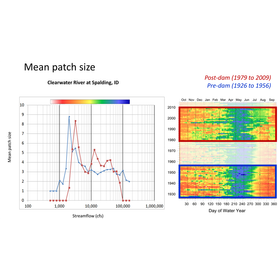
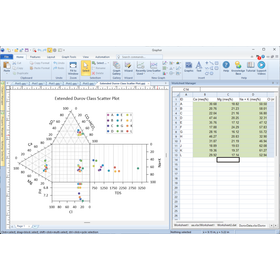
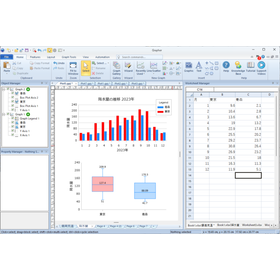
How to Utilize Grapher for Surfer Users

Optimal plot solutions for the environment, water chemistry, and resource/energy sectors.

About Surfer and Grapher Surfer is software that visualizes advanced geospatial data. It is characterized by its emphasis on geographic spatial representation, interpolating XYZ data to create evenly spaced grid data, which can be represented as contour maps or terrain models, and performing data processing such as volume calculations based on the grid data. Grapher is software that excels in representing statistical and numerical data. Among graphing software, it is particularly notable for its ability to create graphs specialized for the environment, water chemistry, and resource/energy fields, allowing for highly customized graphs. Benefits of Surfer users using Grapher By using Grapher, you can incorporate data used in Surfer or results obtained from Surfer. Utilizing common data allows for the creation of more detailed graphs that emphasize specific trends or datasets. With Scripter, it is possible to create automation programs that link Surfer and Grapher together.

  • p_32_04-1024x689.png
  • p_32_03-768x516.png
  • Earth Sciences
  • Other measurement, recording and measuring instruments
  • Distance measuring device
  • Visualization Software

Added to bookmarks

Bookmarks list

Bookmark has been removed

Bookmarks list

You can't add any more bookmarks

By registering as a member, you can increase the number of bookmarks you can save and organize them with labels.

Free membership registration

MotionBoard Case Study: Data Utilization and Visualization in Food Manufacturing Sites

Achieving real-time visualization of production schedule management and equipment monitoring.

MotionBoard meets various data utilization needs in food manufacturing sites. It allows for easy creation of visually appealing screens without programming. Users can accurately grasp the timing of tasks that were previously based on experience and intuition. ■ Implementing Companies Food manufacturers ■ Challenges - Want to visualize performance and operations on management boards - Want to understand performance and operational status through easy-to-understand screens - Monthly creation leads to issues with real-time accuracy and precision ■ Implementation Points - Able to collect, analyze, and visualize real-time data - MotionBoard allows for the creation of easy-to-understand graphs without programming - Utilized for a wide range of applications from production schedule management to integration with IoT systems ■ Effects - Achieved visualization of information requiring real-time data - Enabled maintenance tasks based on accurate data rather than intuition - Improved product quality through data utilization, such as detecting foreign substances in raw materials The time required for data analysis and visualization has been reduced to less than one-tenth, while real-time capabilities have also been secured.

  • Business Intelligence and Data Analysis
  • Other information systems
  • project management
  • Visualization Software

Added to bookmarks

Bookmarks list

Bookmark has been removed

Bookmarks list

You can't add any more bookmarks

By registering as a member, you can increase the number of bookmarks you can save and organize them with labels.

Free membership registration

ConDe MAP <Dense Measures>

Effective for indoor facilities with poor visibility! Automatically detects entry, exit, and movement in the area.

"ConDe MAP" is a product that allows you to remotely check congestion levels. It visualizes congested areas and plots them on a map image, enabling you to voluntarily avoid crowded regions. Additionally, the AI automatically maps the area you want to visualize along with the area map. No complicated setup is required. 【Features】 ■ Remote checking of congestion levels ■ Captures entry and exit ■ Real-time detection of crowded areas ■ AI automatically analyzes the area map ■ Installation is very easy *For more details, please refer to the PDF document or feel free to contact us.

  • others
  • Visualization Software

Added to bookmarks

Bookmarks list

Bookmark has been removed

Bookmarks list

You can't add any more bookmarks

By registering as a member, you can increase the number of bookmarks you can save and organize them with labels.

Free membership registration

Solution "Motivel"

A solution that visualizes motivation in 5 seconds with just sound.

"Motivel" is a solution that enables forward-looking risk management based on high-frequency data for operational risks and human resource risks, which have traditionally been difficult to quantify. All you need is your "voice." It features excellent usability that is intuitive and does not require a manual. Moreover, meaningful words are not necessary. It is not only language-free but also age-free. 【Features】 ■ Easy and Simple: User-friendly interface ■ Anytime, Anywhere: Multi-device support, immediate access to measurement results ■ Accessible to Everyone: Language-free, age-free ■ Low Cost: Subscription-based, no initial setup fees *For more details, please download the PDF or contact us.

  • Other network tools
  • Visualization Software

Added to bookmarks

Bookmarks list

Bookmark has been removed

Bookmarks list

You can't add any more bookmarks

By registering as a member, you can increase the number of bookmarks you can save and organize them with labels.

Free membership registration

Technical support for Power Apps and Power Automate.

Customers struggling with in-house development, let's ask questions about any unclear points in the development process and quickly create your application.

Technical Support We provide support services for operating and developing Power Apps and Power Automate. Our experienced staff will assist you with any questions during development, specification discussions, and technical verifications. 30 hours per month: 450,000 yen (You will be charged even if the support hours are not reached.)

  • Corporate information portal/groupware
  • Visualization Software

Added to bookmarks

Bookmarks list

Bookmark has been removed

Bookmarks list

You can't add any more bookmarks

By registering as a member, you can increase the number of bookmarks you can save and organize them with labels.

Free membership registration

『Letunic iTOL』

Letunic iTOL - An advanced tree visualization and annotation tool

Letunic provides advanced bioinformatics software tools. It translates a wide variety of biological data, such as species, strains, and genes, into easy-to-understand visuals, contributing to the efficiency of research and the promotion of communication. 【Features】 ■ Accessible from anywhere via the cloud ■ Capable of visualizing interactive phylogenetic trees ■ Equipped with a variety of annotation features ■ Seamlessly integrates with spreadsheet software *For more details, please refer to the related links or feel free to contact us.

  • Company:B7
  • Price:Other
  • Software (middle, driver, security, etc.)
  • Visualization Software

Added to bookmarks

Bookmarks list

Bookmark has been removed

Bookmarks list

You can't add any more bookmarks

By registering as a member, you can increase the number of bookmarks you can save and organize them with labels.

Free membership registration

System 3D Antenna Data Visualization Software

This software visualizes data by converting it into three-dimensional (3D) and two-dimensional (2D) graphs.

This software visualizes the test measurement data from the development phase in three-dimensional (3D) and two-dimensional (2D) graphs to evaluate the antenna performance of high-performance mobile devices.

  • Other information systems
  • Visualization Software

Added to bookmarks

Bookmarks list

Bookmark has been removed

Bookmarks list

You can't add any more bookmarks

By registering as a member, you can increase the number of bookmarks you can save and organize them with labels.

Free membership registration

Molecular structure data visualization software

Software for visualizing molecular structures such as proteins, electron density, and nucleic acids.

This is a presentation support software for visualizing molecular structure data such as proteins, electron density, and nucleic acids, and for creating and editing molecular images necessary for papers and presentation materials. 【Features】 ◆ A complete set of tasks can be performed, including loading molecular data, editing molecular representation shapes, editing annotations, and creating high-quality images. ◆ Comes with an interactive 3D viewer that can be plugged into other software. ◆ Allows for the manipulation of edited molecular structures with the mouse (Windows version only), enabling effective presentations like never before. ◆ Compatible with Windows and Mac. = For more details, please contact us =

  • Image analysis software
  • Production Management System
  • Visualization Software

Added to bookmarks

Bookmarks list

Bookmark has been removed

Bookmarks list

You can't add any more bookmarks

By registering as a member, you can increase the number of bookmarks you can save and organize them with labels.

Free membership registration

[Mathematica Introduction Case Study] From Creating Teaching Materials to Analysis and Research

Examples of how to utilize methods for visualizing calculation results.

We would like to introduce a case where 'Mathematica' was utilized in creating teaching materials at Toyama University. This product was used when teaching simple programming and handling methods for visualizing calculation results. It was noted that the environment setup, such as application configuration and compiler, which is necessary for C language/Python, is very easy with this product, making the transfer of small programs very smooth. 【Product Appeal】 ■ Allows for precise evaluation as far as the computational memory permits ■ Even in approximate calculations, you can specify significant figures and precision, allowing you to know which digits in floating-point calculations are reliable ■ Operates the same way on any PC, making setup easy *For more details, please download the PDF or feel free to contact us.

  • 11-2.PNG
  • 11-3.PNG
  • Software (middle, driver, security, etc.)
  • Visualization Software

Added to bookmarks

Bookmarks list

Bookmark has been removed

Bookmarks list

You can't add any more bookmarks

By registering as a member, you can increase the number of bookmarks you can save and organize them with labels.

Free membership registration

VGStudio

Software widely used globally for industrial and academic CT/voxel data processing and visualization.

VGStudio is high-performance software that enables volume rendering for visualizing and creating animations from industrial CT data. It allows for photorealistic rendering using real-time ray tracing, and is used not only for visual quality inspection in industry but also for visualizing data in academic research fields such as archaeology, geology, and medicine. It can perform three-dimensional visualizations, including slice displays at arbitrary cross-sections for visual inspection, as well as translucency at arbitrary locations through volume rendering and cutting within the data. Since it can directly handle voxel data, there is no need to convert it into polygon data. Additionally, it allows for easy animation creation from the visualized objects.

  • Other inspection equipment and devices
  • Visualization Software

Added to bookmarks

Bookmarks list

Bookmark has been removed

Bookmarks list

You can't add any more bookmarks

By registering as a member, you can increase the number of bookmarks you can save and organize them with labels.

Free membership registration

Flow visualization software 'R-VIEW'

This is software for easily visualizing flow in closed spaces!

"R-VIEW" is software designed to meet the needs of those who want to quantitatively understand actual flow patterns and validate results obtained from fluid simulations through visualization experiments, enabling easy measurement of three-dimensional velocity distributions. In addition to a simple shape creation function, it includes post-processing and graph display features for visualizing particle (tracer) trajectories and three-dimensional velocity distributions. 【Processing Flow】 1. Particle extraction 2. Input of device shape and camera calibration 3. Extraction of the three-dimensional position of particles 4. Post-processing *For more details, please refer to the PDF document or feel free to contact us.

  • Software (middle, driver, security, etc.)
  • Visualization Software

Added to bookmarks

Bookmarks list

Bookmark has been removed

Bookmarks list

You can't add any more bookmarks

By registering as a member, you can increase the number of bookmarks you can save and organize them with labels.

Free membership registration

Packet analysis and visualization software

Easily perform analysis and visualization of network data! Simultaneous analysis and monitoring by multiple users is possible.

PureInsight is software for analyzing and visualizing network data. Depending on the license, multiple users can log in simultaneously, allowing each user to execute tasks such as analysis and monitoring individually. ■ Network Visualization - Displays network traffic as node graphs or tables, visualizing the network. - Hovering over a node shows detailed information about that node. - Understand the reliability, owner details, and location information of potentially dangerous IP addresses. ■ Benefits of Use - Achieve network visualization, analysis, and extraction with a single tool. - Pinpoint abnormal traffic within the network. - Collect data for security analysis. - Monitor network bandwidth usage. - Analyze network performance. *For more details, please download the catalog or contact us.

  • Server monitoring and network management tools
  • Visualization Software

Added to bookmarks

Bookmarks list

Bookmark has been removed

Bookmarks list

You can't add any more bookmarks

By registering as a member, you can increase the number of bookmarks you can save and organize them with labels.

Free membership registration

Visualization software "AVS Developer"

Simply combine the modules with mouse operations to easily achieve the desired visualization!

"AVS Developer" is a visualization software that allows for flexible combinations. Users can also add functionality by creating their own modules. We offer high-spec model "Type-XWT for AVS Developer" as well as "Type-S8 for MicroAVS." 【Features】 ■ Visual programming ■ Abundant visualization/graphics functions ■ Support for various data types ■ Multi-platform ■ Easy prototyping *For more details, please refer to the PDF document or feel free to contact us.

  • image_07.png
  • Desktop PC
  • Other PCs and OA equipment
  • 2D CAD machine
  • Visualization Software

Added to bookmarks

Bookmarks list

Bookmark has been removed

Bookmarks list

You can't add any more bookmarks

By registering as a member, you can increase the number of bookmarks you can save and organize them with labels.

Free membership registration

Stress Tensor Visualization Software Meshman_Principal Stress Ver.3.5

Display the set stress state as three types of 3D shapes! The phase of each axis can be specified separately in degrees.

In the training of design engineers on the subject of mechanics of materials, understanding principal stresses is one of the essential learning objectives. "Meshman_Principal Stress Ver.3.5" is a stress tensor visualization software that allows users to numerically verify stress components, Mises stress, stress invariants, and more. It enables the rotation of the observation coordinate system and stress field in any direction, allowing users to observe how stress components change. The relationship between stress and each component of the stress tensor, as well as the values of invariants related to stress, is displayed through numerical data and 3D graphics, showing how they change when the coordinate axes are altered, thereby supporting further understanding for learners of mechanics of materials. 【Features】 ■ Input values for principal stresses or stress components to set the state of stress ■ Display the set state of stress as three types of 3D shapes ■ The 3D shapes show color contours representing the state of stress and the pattern of the mesh ■ Display the state of stress on the surface of a cube representing the observation coordinate system with arrows ■ Show a cutting plane that can be rotated in any direction and display the state of stress on that plane *For more details, please refer to the PDF document or feel free to contact us.

  • Software (middle, driver, security, etc.)
  • Other embedded systems (software and hardware)
  • Visualization Software

Added to bookmarks

Bookmarks list

Bookmark has been removed

Bookmarks list

You can't add any more bookmarks

By registering as a member, you can increase the number of bookmarks you can save and organize them with labels.

Free membership registration

The possibilities of data visualization

A new approach to visualizing IoT data that combines a chat interface with LLM!

How do you access information within your company or information in business systems on a daily basis? Do you search on the corporate portal site, open a dedicated dashboard, or look through the file server? This time, I would like to consider the possibilities of "methods of accessing information" from the perspective of something that is becoming increasingly commonplace to use. *You can view the detailed content of the blog through the related links. For more information, please feel free to contact us.*

  • Other information systems
  • Visualization Software

Added to bookmarks

Bookmarks list

Bookmark has been removed

Bookmarks list

You can't add any more bookmarks

By registering as a member, you can increase the number of bookmarks you can save and organize them with labels.

Free membership registration

FusionCharts

Provides over 100 interactive charts and more than 2000 data-driven maps.

FusionCharts is an interactive chart for web and mobile created with JavaScript. The features of FusionCharts include providing over 100 interactive charts and more than 2000 data-driven maps. There are popular chart variations such as Bar, Column, Line, Area, Pie, as well as domain-specific charts like Treemaps, Heatmaps, Gantt Charts, Marimekko Charts, Gauges, Spider Charts, and Waterfall Charts. 【About Licensing (Partial)】 ■Basic ・Developer: Up to 1 person On Prem Apps (OEM)/SaaS Apps not allowed Full Source Code not allowed FusionExport not allowed *For more details, please refer to the related links or feel free to contact us.

  • Company:B7
  • Price:Other
  • Other network tools
  • Visualization Software

Added to bookmarks

Bookmarks list

Bookmark has been removed

Bookmarks list

You can't add any more bookmarks

By registering as a member, you can increase the number of bookmarks you can save and organize them with labels.

Free membership registration

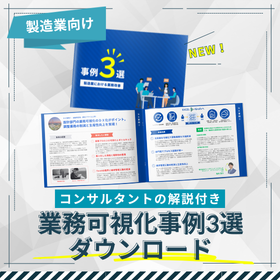
Three Examples of Business Visualization for the Automotive Industry

Solving the challenges of the automotive industry aimed at improving quality.

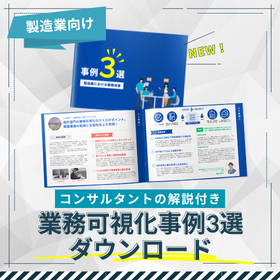
In the automotive industry, maintaining and improving quality is the source of competitiveness. Mistakes and rework in the manufacturing process can lead to a decline in product quality and potentially undermine customer trust. Visualizing and standardizing operations are essential for strengthening quality management. This case study collection introduces the initiatives of three companies that have successfully improved their operations. You will learn about the practical points of business reform utilizing the operational visualization and analysis tool "iGrafx." 【Usage Scenarios】 - Analysis of quality issues in the manufacturing process - Standardization of quality management processes - Facilitation of information sharing between departments 【Effects of Implementation】 - Early detection and countermeasures for quality issues - Reduction of quality management costs - Improvement of customer satisfaction

  • スクリーンショット 2025-12-04 184213.png
  • Visualization
  • project management
  • Visualization Software

Added to bookmarks

Bookmarks list

Bookmark has been removed

Bookmarks list

You can't add any more bookmarks

By registering as a member, you can increase the number of bookmarks you can save and organize them with labels.

Free membership registration

Three Examples of Business Visualization for Electronic Devices

Achieving yield improvement through knowledge sharing and standardization of operations.

In the electronics industry, improving yield is essential for enhancing profitability. The occurrence of defective products in the manufacturing process not only leads to increased costs but can also undermine customer trust. The personalization of operations and lack of standardization are factors that can worsen yield. By utilizing the business visualization and analysis tool "iGrafx" to improve business processes, we aim to enhance yield. 【Usage Scenarios】 - High rate of defective products in the manufacturing process - Many oversights in the inspection process - Lack of progress in standardizing operations 【Effects of Implementation】 - Reduction in the rate of defective products - Increased efficiency in the inspection process - Stabilization of quality through standardization of operations

  • スクリーンショット 2025-12-04 184213.png
  • Visualization
  • project management
  • Visualization Software

Added to bookmarks

Bookmarks list

Bookmark has been removed

Bookmarks list

You can't add any more bookmarks

By registering as a member, you can increase the number of bookmarks you can save and organize them with labels.

Free membership registration

Quality Improvement through Workflow-Based Manuals for the Manufacturing Industry

Improve the quality of the manufacturing process through the visualization of operations!

In the manufacturing industry, quality control is a crucial factor that influences the reliability of products. The occurrence of defective products can lead to increased costs and a loss of trust from customers. When operations become personalized and procedures are unclear, mistakes are more likely to occur. A workflow-based manual visualizes the manufacturing process and clarifies what, when, and how to do things, enabling the reduction of administrative errors and ensuring reliable administrative execution. 【Usage Scenarios】 - Standardization of procedures in the manufacturing process - Strengthening the inspection system in quality control - Streamlining training for new employees 【Effects of Implementation】 - Improvement in quality through visualization of the manufacturing process - Reduction of mistakes and cost savings - Shortening of training time and quicker integration into the workforce

  • Document and Data Management
  • others
  • Visualization Software

Added to bookmarks

Bookmarks list

Bookmark has been removed

Bookmarks list

You can't add any more bookmarks

By registering as a member, you can increase the number of bookmarks you can save and organize them with labels.

Free membership registration

Explaining the specific steps to streamline retail inventory management in seven steps.

Explaining the solution to inventory management challenges in seven steps.

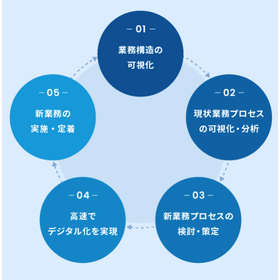
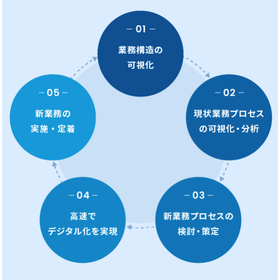
In inventory management within the retail industry, it is important to minimize product loss and optimize the balance between supply and demand. Particularly in retail businesses that handle a wide variety of products, excess or insufficient inventory can significantly impact profits. By visualizing business processes, it becomes possible to identify challenges in inventory management and implement improvement measures. This document explains a specific approach to visualizing business processes in "seven steps." From project initiation to inventory counting, visualization, improvement, operation, and establishment, it outlines how to proceed to prevent failures and ensure results. Please use it as a guide to grasp the overall picture. 【Usage Scenarios】 - Visualization of inventory management processes - Streamlining ordering operations - Improving inventory counting tasks 【Benefits of Implementation】 - Cost reduction through inventory optimization - Prevention of lost sales opportunities due to stockouts - Improvement of operational efficiency

Added to bookmarks

Bookmarks list

Bookmark has been removed

Bookmarks list

You can't add any more bookmarks

By registering as a member, you can increase the number of bookmarks you can save and organize them with labels.

Free membership registration

Strengthening Compliance with BPR+ for Financial Institutions

Visualize business processes and reduce compliance risks.

In the compliance department of financial institutions, adherence to laws and regulations and the strengthening of internal controls are essential. As business processes become more complex, it is necessary to detect compliance violations early and correct them. By visualizing business processes, it becomes possible to clarify issues and risks in operations and implement improvement measures. BPR+ contributes to the strengthening of compliance systems in financial institutions. 【Usage Scenarios】 - Compliance checks - Strengthening internal controls - Visualizing business processes 【Effects of Implementation】 - Reducing the risk of compliance violations - Strengthening internal controls - Improving operational efficiency - Enhancing risk management systems

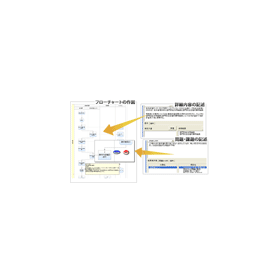
  • bpr_fea_01.gif
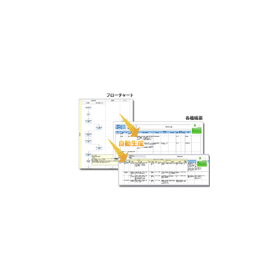
  • bpr_fea_02.gif
  • bpr_fea_03.gif
  • Workflow System
  • Visualization Software

Added to bookmarks

Bookmarks list

Bookmark has been removed

Bookmarks list

You can't add any more bookmarks

By registering as a member, you can increase the number of bookmarks you can save and organize them with labels.

Free membership registration

Understanding Through Manga! The Effectiveness of Workflow-Type Manuals for Logistics

Visualize business processes and achieve time reduction in logistics operations!

In the logistics industry, efficiency and quick responses are required. In particular, smoothly advancing the process from receiving to shipping contributes to increased customer satisfaction. When operations become complex and procedures are unclear, it can lead to increased work time and mistakes, resulting in delays in service delivery to customers. Workflow-based manuals visualize the flow of operations, allowing anyone to instantly understand the tasks, thereby contributing to time savings and reduction of errors. 【Usage Scenarios】 - Reducing time for receiving and shipping operations - Improving efficiency in picking operations - Streamlining training for new employees 【Effects of Implementation】 - Reduction in work time - Decrease in mistakes - Improvement in operational quality

  • Document and Data Management
  • others
  • Visualization Software

Added to bookmarks

Bookmarks list

Bookmark has been removed

Bookmarks list

You can't add any more bookmarks

By registering as a member, you can increase the number of bookmarks you can save and organize them with labels.

Free membership registration

A 7-Step Guide to Improving Operational Efficiency for Medical Collaboration

Seven Steps to Successfully Achieve Medical Collaboration through Business Visualization

In the healthcare industry, it is important for information sharing between departments and medical institutions to be conducted smoothly. Delays or errors in communication can negatively impact patient care. By visualizing and standardizing business processes, we can enhance the accuracy of information sharing and facilitate collaboration. This document explains a specific approach to visualizing business processes in "seven steps." It serves as a guide on how to proceed from project initiation to inventory, visualization, improvement, operation, and establishment, ensuring that failures are prevented and results are reliably achieved. 【Usage Scenarios】 - Information collaboration between medical institutions - Information sharing between departments - Collaboration in clinical processes 【Benefits of Implementation】 - Increased efficiency in information sharing - Reduction of collaboration errors - Improvement in the quality of patient care

Added to bookmarks

Bookmarks list

Bookmark has been removed

Bookmarks list

You can't add any more bookmarks

By registering as a member, you can increase the number of bookmarks you can save and organize them with labels.

Free membership registration